
Workday Terminations: Automate Backfills for Streamlined Position Management

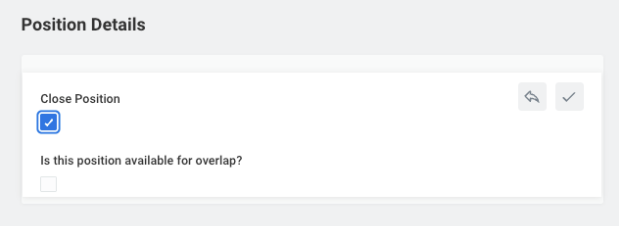
You've probably dealt with this scenario in the last few months: An employee terminates, and someone processing the Workday termination sees that dreaded "Close Position" checkbox. Do they check it? Leave it unchecked? Who decides if this role gets backfilled or eliminated? This simple field creates chaos across Finance, HR, and Recruiting teams overseeing the headcount management process.
Workday position management during a termination can create severe downstream implications because position closure decisions are often made by an initiator without the authority or context to make the right choice. The person entering the Workday termination data isn't necessarily the budget (or process) owner who should decide whether to backfill the position, split it, re-allocate it, or close it.
When termination processing lacks proper governance, positions disappear from workforce planning, backfill decisions get made accidentally, and Finance loses visibility into headcount changes. But with the right approach and tools like comprehensive headcount management software, termination processing becomes a streamlined, automated workflow that actually supports your Workday headcount management strategy.
The Termination Processing Complexity Trap
The most common headcount management mistake organizations make when it comes to Workday terminations is allowing anyone with Workday termination initiator access to close positions during the termination process. A manager terminates an employee and sees the "close position" field. Without clear guidance, they might close it assuming the role is eliminated, or leave it open thinking someone else will decide later.
Immediate Reconciliation Nightmares for HR Teams
Finance pulls reports showing open positions that should have been closed, or discovers closed positions that were supposed to be backfilled. HR Operations spends hours manually reviewing terminated employees to determine which positions need action.
Inaccurate Workforce Planning
Position closure decisions during terminations directly impact workforce planning accuracy. When a position gets closed in Workday, it disappears from Finance's open position reports, meaning they lose visibility into potential backfill costs.
Increased Complexity with Multiple Stakeholders
The complexity multiplies when backfill decisions involve multiple stakeholders. The manager processing the termination might not know the budget implications, the Finance team might not understand the operational impact, and Recruiting needs to know immediately whether to start sourcing candidates.
4 Steps to Streamline Workday Termination Processing and Backfills
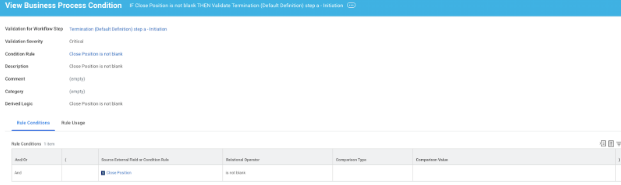
1. Add a Validation Rule on the Termination Business Process Initiation - Create a validation condition rule that triggers when someone attempts to close a position during Workday termination. The rule should display an error message that prevents submission.
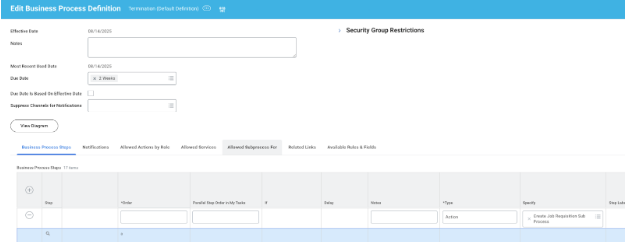
2. Implement Automated Backfill Workflows Using Workday's Job Requisition Sub-Process - Configure an allowable sub-process on termination that automatically creates a job requisition against the existing position when someone terminates. This kicks off recruiting immediately while maintaining the position for workforce planning purposes.
3. Establish Clear Governance Around Who Can Make Position Closure Decisions - Limit Workday termination processing access to HR Partners while giving budget owners and department heads separate workflows for position closure and backfill position decisions.

4. Create Regular Position Reconciliation Reporting - Set up automated reports that show terminated employees whose positions remain open.
The key is removing Workday position management decisions from the urgent, administrative task of processing terminations and creating intentional workflows for workforce planning decisions.
Streamline and Automate Complex Termination Processing with Intuitive Headcount Management Software
Intelligent Position Status Management
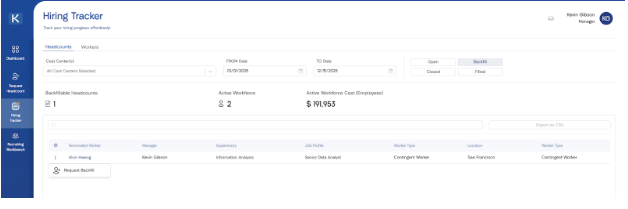
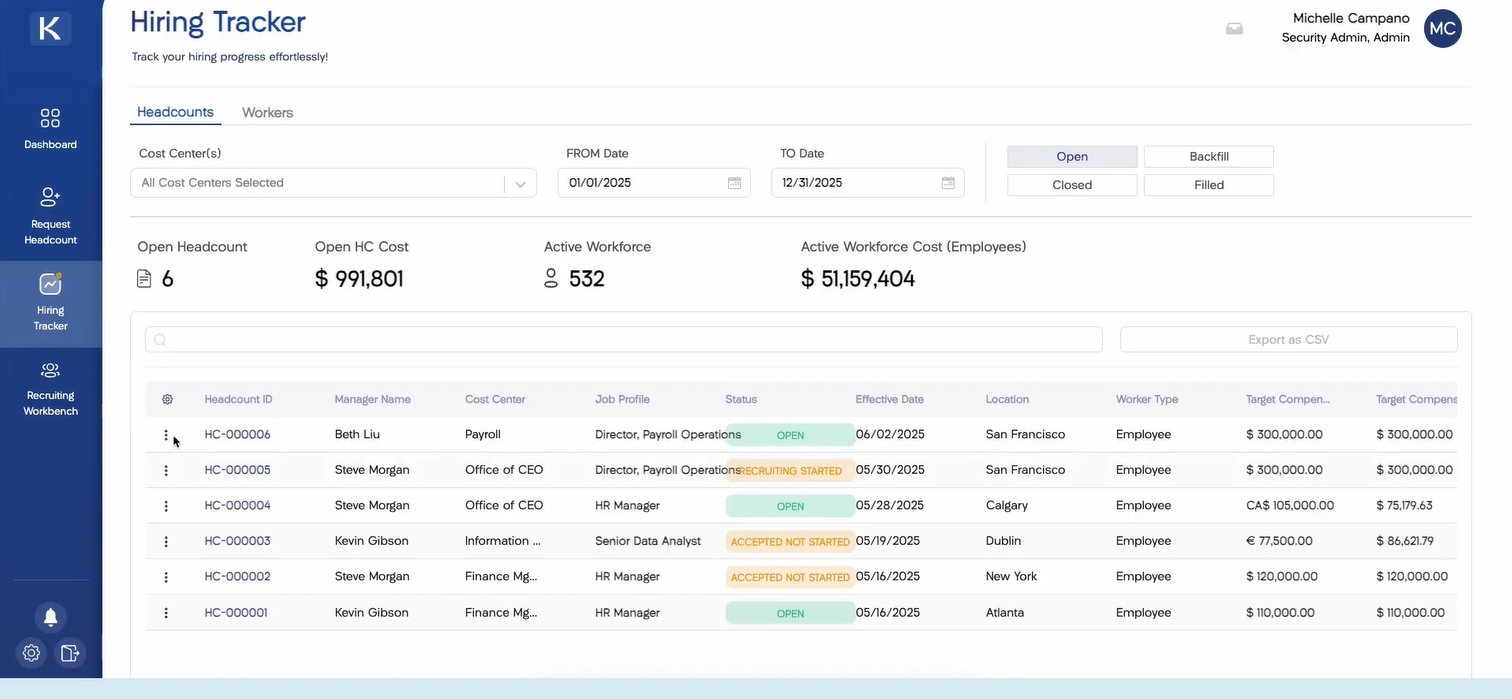
When a Workday termination happens, Kinnect automatically ingests this data and moves the position to the backfill tab in the hiring tracker. This removes the position closure decision from the termination process entirely.
Automated Backfill Decision Workflows
Managers and budget owners receive notifications about terminated employees through the streamlined headcount management software interface, where they can review the role, assess business needs, and choose to either request a backfill position or close the position. Even if the termination is future-dated, recruiting can begin immediately.
Elimination of Manual Reconciliation Work & Immediate ROI
Kinnect's approach completely eliminates the reconciliation nightmares. The backfill position workflow decouples position management from worker data. That means:
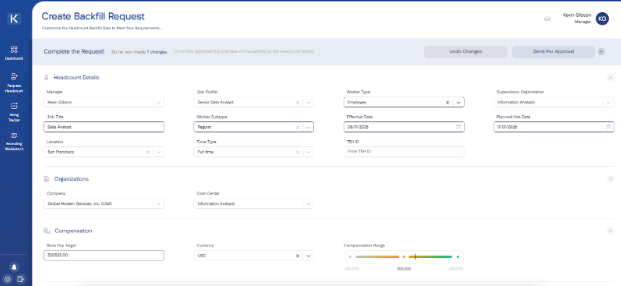
Position closure decisions happen with full visibility into budget impact, team structure, and business needs
Finance maintains complete visibility into all position changes through real-time reporting
Recruiting gets immediate clarity on which roles need to be filled
Results organizations see:
70% reduction in time spent on termination-related position management tasks
Eliminate costly hiring delays from unclear decisions
Free up HR teams to focus on strategic initiatives instead of administrative cleanup
You Can Transform Your Termination Processing from Complex to Easy
Workday termination processing doesn't have to create organizational chaos or endless reconciliation work. The most successful organizations recognize that complexity stems from forcing Workday position management decisions into administrative workflows where they don't belong. When you separate the urgent task of processing terminations from strategic backfill position decisions, terminations become opportunities for intentional workforce planning rather than sources of confusion.
Ready to stop letting Workday termination processing drain your team's productivity and create workforce planning chaos? Book your free personalized demo today and discover how Kinnect transforms complex termination workflows into streamlined, automated processes that actually support your business goals.
Ready to transform your headcount management? Book a demo with Seena